We can insert one or more lines to ABAP internal tables using the
INSERT statement. To insert a single line, first place the values we
want to insert in a work area and use the INSERT statement to insert the
values in the work area to internal table.
Syntax to insert a line to internal table
INSERT <work area> INTO TABLE <internal table>.
                       OR
INSERT <work area> INTO <internal table> INDEX <index>.
The first INSERT statement without INDEX addition will simply add the
record to the end of the internal table. But if we want to insert the
line to specific location i.e. if we want to insert it as second record
then we need to specify 2 as the index in the INSERT statement.
*--------------------------------------------------------------*
*Data Types
*--------------------------------------------------------------*
TYPES: BEGIN OF ty_student,
       id(5)    TYPE n,
       name(10) TYPE c,
       END OF ty_student.

*--------------------------------------------------------------*
*Data Declaration
*--------------------------------------------------------------*
DATA: gwa_student TYPE ty_student.
DATA: it TYPE TABLE OF ty_student.

gwa_student-id    = 1.
gwa_student-name  = 'JOHN'.
INSERT gwa_student INTO TABLE it.

gwa_student-id    = 2.
gwa_student-name  = 'JIM'.
INSERT gwa_student INTO TABLE it.

gwa_student-id    = 3.
gwa_student-name  = 'JACK'.
INSERT gwa_student INTO TABLE it.

WRITE:/ 'ID' COLOR 5,7 'Name' COLOR 5.
LOOP AT it INTO gwa_student.
  WRITE:/ gwa_student-id, gwa_student-name.
ENDLOOP.

SKIP.
WRITE:/ 'After using Index addition' COLOR 4.

gwa_student-id    = 4.
gwa_student-name  = 'RAM'.
INSERT gwa_student INTO it INDEX 2.

WRITE:/ 'ID' COLOR 5,7 'Name' COLOR 5.
LOOP AT it INTO gwa_student.
  WRITE:/ gwa_student-id, gwa_student-name.
ENDLOOP.
Output

We can also insert multiple lines to an internal table with a single
INSERT statement i.e. we can insert the lines of one internal table to
another internal table.
Syntax to insert multiple lines to internal table
INSERT LINES OF <itab1> [FROM <index 1>] [TO <index 2>] INTO TABLE <itab2>.
                                        OR
INSERT LINES OF <itab1> [FROM <index 1>] [TO <index 2>] INTO
<itab2> INDEX <index>.
*--------------------------------------------------------------*
*Data Types
*--------------------------------------------------------------*
TYPES: BEGIN OF ty_student,
       id(5)    TYPE n,
       name(10) TYPE c,
       END OF ty_student.

*--------------------------------------------------------------*
*Data Declaration
*--------------------------------------------------------------*
DATA: gwa_student TYPE ty_student.
DATA: it  TYPE TABLE OF ty_student,
      it2 TYPE TABLE OF ty_student,
      it3 TYPE TABLE OF ty_student,
      it4 TYPE TABLE OF ty_student.

gwa_student-id    = 1.
gwa_student-name  = 'JOHN'.
INSERT gwa_student INTO TABLE it.

gwa_student-id    = 2.
gwa_student-name  = 'JIM'.
INSERT gwa_student INTO TABLE it.

gwa_student-id    = 3.
gwa_student-name  = 'JACK'.
INSERT gwa_student INTO TABLE it.

gwa_student-id    = 4.
gwa_student-name  = 'ROB'.
INSERT gwa_student INTO TABLE it.

WRITE:/ 'Inserting all the lines of IT to IT2' COLOR 4.

INSERT LINES OF it INTO TABLE it2.

WRITE:/ 'Display values of IT2' COLOR 1.
WRITE:/ 'ID' COLOR 5,7 'Name' COLOR 5.
LOOP AT it2 INTO gwa_student.
  WRITE:/ gwa_student-id, gwa_student-name.
ENDLOOP.

SKIP.
WRITE:/ 'Inserting only lines 2 & 3 of IT to IT3' COLOR 4.

INSERT LINES OF it FROM 2 TO 3 INTO TABLE it3.

WRITE:/ 'Display values of IT3' COLOR 1.
WRITE:/ 'ID' COLOR 5,7 'Name' COLOR 5.
LOOP AT it3 INTO gwa_student.
  WRITE:/ gwa_student-id, gwa_student-name.
ENDLOOP.

gwa_student-id    = 1.
gwa_student-name  = 'RAM'.
INSERT gwa_student INTO TABLE it4.

gwa_student-id    = 4.
gwa_student-name  = 'RAJ'.
INSERT gwa_student INTO TABLE it4.

SKIP.
WRITE:/ 'Inserting only lines 2 & 3 of IT to IT4 at 2' COLOR 4.

INSERT LINES OF it FROM 2 TO 3 INTO it4 INDEX 2.

WRITE:/ 'Display values of it4' COLOR 1.
WRITE:/ 'ID' COLOR 5,7 'Name' COLOR 5.
LOOP AT it4 INTO gwa_student.
  WRITE:/ gwa_student-id, gwa_student-name.
ENDLOOP.
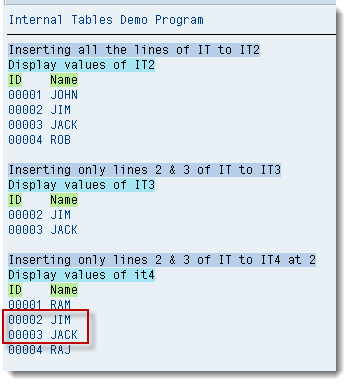
The last INSERT statement in the above program inserts the 2nd and
3rd line from IT at index 2 in IT4, so the new lines inserted becomes
the 2nd and 3rd line in IT4.
Output